
Basic TEU Harvester: Difference between revisions
Начало |
m unnecessary words in the template |
||
| (13 intermediate revisions by the same user not shown) | |||
| Line 1: | Line 1: | ||
{{ | {{Tools | ||
| | | Name = Basic TEU Harvester | ||
| | | Image = Basic TEU Harvester.jpg | ||
| | | Range = 96 m | ||
| | | Efficiency = 1.00 | ||
| Conductivity = 2100 TeV | |||
| | |||
}} | }} | ||
'''Basic TEU Harvester''' is a basic [[TEU]] collector. | |||
The device is included in the Globula application's starter kit and cannot be produced from blueprints, sold, transferred, or destroyed. | |||
[[ | == Usage == | ||
To activate any harvester, place it in the [[Upper Slot]] (on the main screen). | |||
To start energy collection, meet the following conditions: | |||
# Maintain the speed range. | |||
# The accelerometer must confirm movement. | |||
The scale on the right shows the optimal speed range, current speed, and accelerometer verification result. If the speed bar is red, your movement is too smooth. | |||
If your speed is within the effective range and the bar is not red, TEU will be collected. | |||
=== Usage Efficiency === | |||
Device efficiency increases with speed up to 9 km/h. Exceeding this limit stops TEU collection. | |||
== Where Collected TEU Goes == | |||
[[File:Basic TEU Harvester Work.gif|thumb|left|250px|TEU collection visualization]] | |||
<br> | |||
* Collected energy first goes to the [[Lower Slot]]. | |||
* If there is an uncharged battery in the lower slot, it will start charging. | |||
* If the battery is full or the slot is empty, TEU is directed to the existensor ([[Existensor]]). | |||
* If the existensor is not full, it will start filling. | |||
* If the existensor is full, TEU is redirected to remote storage ([[Remote Storage]]). | |||
<br> | |||
<br> | |||
== Pocket Collection Mode == | |||
[[File:Рocket mode.jpg|thumb|250px|Pocket mode on/off]] | |||
All harvesters have a pocket mode switch between the upper and lower slots. | |||
To enable, slide the slider to the right, as shown in the image. | |||
The mode is designed for economical and touch-protected TEU collection. | |||
Latest revision as of 12:06, 23 December 2025
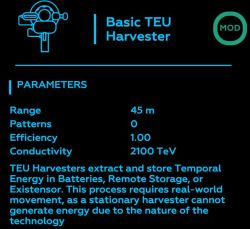

Basic TEU Harvester is a basic TEU collector.
The device is included in the Globula application's starter kit and cannot be produced from blueprints, sold, transferred, or destroyed.
Usage
[edit]To activate any harvester, place it in the Upper Slot (on the main screen).
To start energy collection, meet the following conditions:
- Maintain the speed range.
- The accelerometer must confirm movement.
The scale on the right shows the optimal speed range, current speed, and accelerometer verification result. If the speed bar is red, your movement is too smooth.
If your speed is within the effective range and the bar is not red, TEU will be collected.
Usage Efficiency
[edit]Device efficiency increases with speed up to 9 km/h. Exceeding this limit stops TEU collection.
Where Collected TEU Goes
[edit]
- Collected energy first goes to the Lower Slot.
- If there is an uncharged battery in the lower slot, it will start charging.
- If the battery is full or the slot is empty, TEU is directed to the existensor (Existensor).
- If the existensor is not full, it will start filling.
- If the existensor is full, TEU is redirected to remote storage (Remote Storage).
Pocket Collection Mode
[edit]
All harvesters have a pocket mode switch between the upper and lower slots. To enable, slide the slider to the right, as shown in the image. The mode is designed for economical and touch-protected TEU collection.